





Polyphone plugin
Polyphone also exists as a plugin for digital audio workstations (DAW) and the other hosts of audio plugins. The plugin plays soundfonts in the formats sf2, sf3, sfz and dls with the synthesizer of Polyphone: a soundfont sounds the same in a host and in the editor. It plays the soundfonts but doesn't edit them: the changes are made in Polyphone, and the soundfont is then opened again in the plugin.
The plugin is available in the formats VST3, CLAP and LV2 on Linux, Windows and macOS, and also Audio Unit (AU) on macOS.
Installation
The plugin is distributed in an archive for each operating system, available in the section “Software”. Copy the formats used by your host in the folders where it looks for the plugins, then rescan the plugins in the host.
- Linux
- Polyphone.vst3 in ~/.vst3/,
Polyphone.clap in ~/.clap/,
Polyphone.lv2 in ~/.lv2/. - macOS
- Polyphone.vst3 in ~/Library/Audio/Plug-Ins/VST3/,
Polyphone.clap in ~/Library/Audio/Plug-Ins/CLAP/,
Polyphone.component in ~/Library/Audio/Plug-Ins/Components/ (Audio Unit format, used by Logic Pro and GarageBand),
Polyphone.lv2 in ~/Library/Audio/Plug-Ins/LV2/. - Windows
- Polyphone.vst3 in C:\Program Files\Common Files\VST3,
Polyphone.clap in C:\Program Files\Common Files\CLAP,
Polyphone.lv2 in %APPDATA%\LV2.
On macOS, the plugins are not notarized: if the host refuses to load them, remove the quarantine flag of the downloaded files, for instance:
xattr -dr com.apple.quarantine ~/Library/Audio/Plug-Ins/VST3/Polyphone.vst3Soundfont
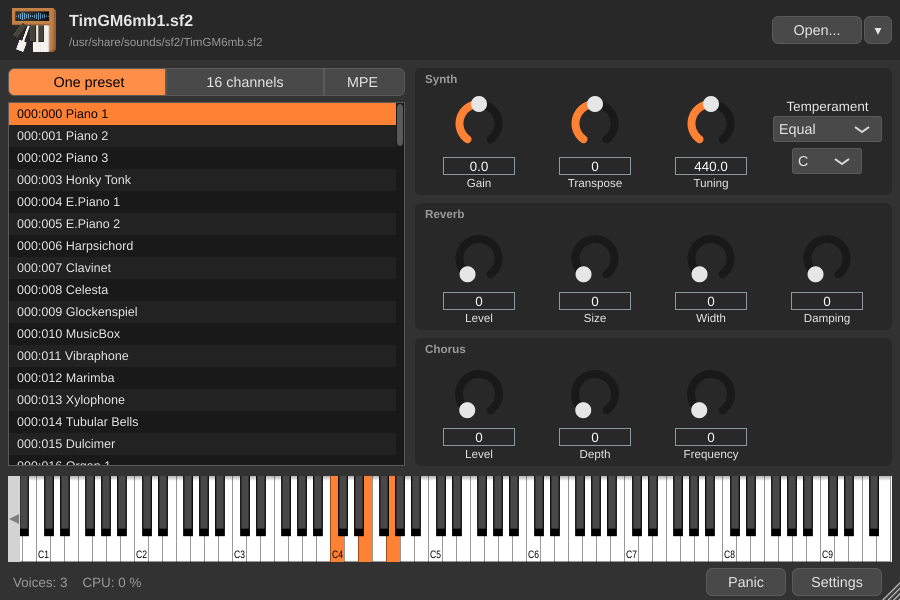
The top of the window shows the name of the soundfont and its path. A soundfont is opened:
- with the button Open...,
- with the arrow on its right, listing the last 10 soundfonts opened,
- by dropping a file on the window.
The sfz and dls files are converted as Polyphone imports them, the samples of an sfz file being the audio files it references. The whole soundfont is read when it is opened, the samples of an sf3 file being decompressed: nothing is read on the disk while playing. When several instances of the plugin play the same file (one per track for instance), the file is read and kept in memory only once. If the file has changed, for instance after being saved again in Polyphone, it is read again.
Playing modes
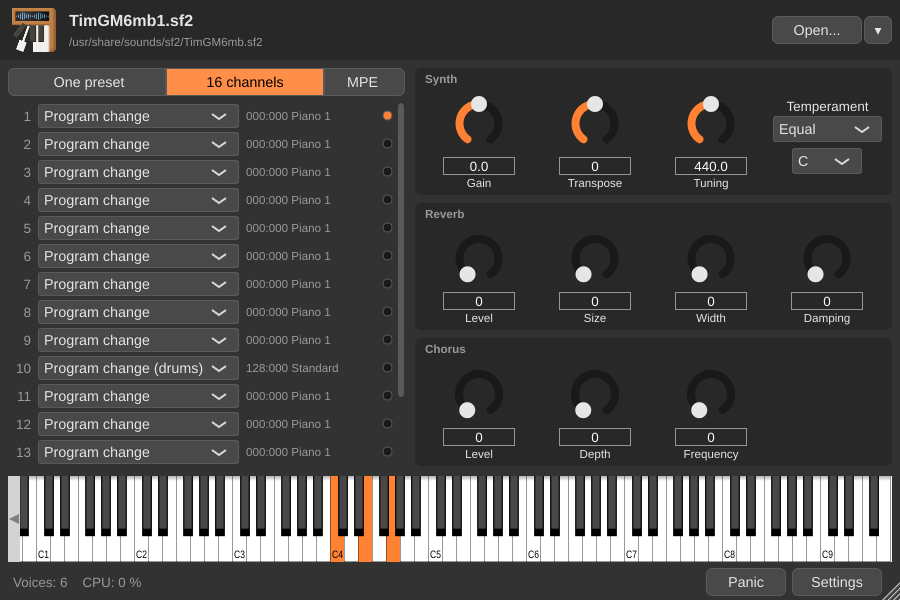
Three buttons above the list of presets choose how the presets are played:
- One preset
- The preset selected in the list is played on the 16 MIDI channels. The presets are displayed with their bank and preset numbers, for instance “000:024 Guitar”.
- 16 channels
- Each MIDI channel plays its own preset, chosen in its row. The choice Program change plays the preset chosen by the bank select and program change messages received by the channel, as a General MIDI synthesizer does: the bank 128 is then used on the channel 10, for the drums. The preset played is displayed on the right of each row. This mode is convenient for playing a MIDI file arranged for several instruments.
- MPE
- The selected preset is played by an MPE controller (MIDI Polyphonic Expression): each note has its own channel, and thus its own pitch bend, pressure and timbre (CC 74). A lower zone of 15 channels is used until the controller sends its configuration (RPN 6). The master channel of a zone acts on all its notes: its pitch bend is added to the one of each note and its controllers apply to all of them. The pitch bend range is 48 semitones for the notes and 2 semitones for the master channel, and can be changed by the controller (RPN 0).
Parameters
The parameters on the right are the ones of the synthesizer of Polyphone, which can be found in its sound and keyboard settings:
- Synth
- Gain (from -50 to +50 dB), Transpose (from -24 to +24 semitones, the drums being not transposed), Tuning (reference pitch of the A4, from 400 to 480 Hz) and Temperament, whose fine tunes are relative to the key chosen below the list.
- Reverb
- Level, Size, Width and Damping.
- Chorus
- Level, Depth and Frequency.
All these parameters can be automated by the host.
Keyboard and status
The keyboard at the bottom of the window shows the notes received, and can be played with the mouse. Below, the number of voices playing and the share of the processor taken by the plugin are displayed.
The button Panic stops all the sounds and resets the controllers, which is useful if a note is stuck.
Settings
The button Settings opens a menu with the following options:
- Polyphony
- Maximum number of voices, from 64 to 4096 (1024 by default). Above this number, the quietest notes fade out.
- Keyboard
- MIDI channel of the notes played with the keyboard of the window.
- Language
- Language of the plugin, by default the one of the system. This choice is shared by all instances of the plugin. The names of the parameters and of the outputs given to the host are the ones of the language used when the plugin is loaded (always English with LV2).
- Store the soundfont in the project
- The soundfont is saved in the project of the host, which can then be opened on another computer without the file. This is not possible with an sfz file, whose samples are other files.
- Channels and effects on their own outputs
- In addition to the main output, the outputs “Channel 1” to “Channel 16” receive the notes of their channel without effect, and the output “Effects” receives the part sent to the reverb and to the chorus. A channel whose output is not enabled by the host stays in the main output. When this option is disabled (default), everything is mixed in the main output.
Use in a project
The project of the host saves the parameters, the presets played, the polyphony and the path of the soundfont (or its content, if it is stored in the project). When a project is opened, the soundfont is read before the rest is restored, so that an offline export can start at once.
A note starts exactly at the position of its MIDI message, whatever the buffer size of the host. During an offline export, the voices are never limited by the processor load.
Polyphone is free but there are costs associated with its website and development. A small donation will help a lot.
Donatetop