





Article category
Software
Date
Version 2.7
Polyphone 2.7 opens up to the DLS format, comes with a MIDI file player and makes the sound engine faster and steadier when many notes are played at once. Many tickets opened on GitHub have also been processed, making everyday use smoother.
DLS format
DLS files (Downloadable Sounds) are sound banks close to soundfonts, used for example by the General MIDI synthesizer built into Windows. Polyphone can now open DLS files (levels 1 and 2) and export soundfonts in the DLS format (level 2.2).
The two formats don’t apply the same default modulators: the differences are compensated during the import and the export so that the sound remains the same. The export is done with the export tool or the command line, and DLS files can be browsed in the soundfont explorer like the other formats. The limitations of the conversion are described in this page.
MIDI player
A MIDI player, opened from the toolbar, plays MIDI files with the soundfonts open in Polyphone. Testing a soundfont with a real piece of music no longer requires an external player sending its MIDI messages to Polyphone.
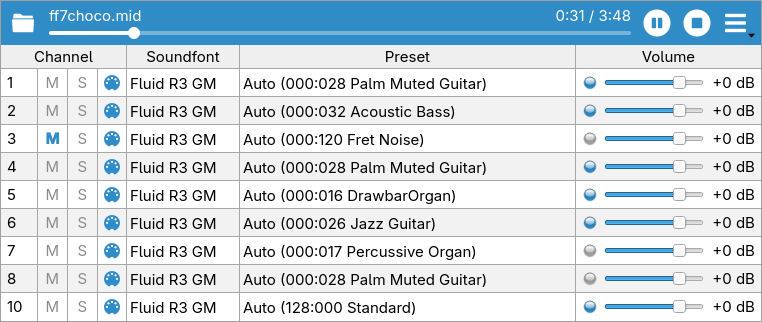
For each channel of the file, it is possible to:
- choose the soundfont and the preset: by default, the preset follows the bank and program changes of the file and is displayed live;
- adjust the volume, mute the channel or play it solo;
- watch its activity and the current values of its MIDI controllers.
The playback settings enable a loop, change the tempo (from 25 to 200%) or transpose the music (±12 semitones). Finally, a MIDI file can be exported to a wav file, from the same menu or with the command line.
The MIDI player is also available when Polyphone is used as a synthesizer.
Sound engine
Performance and voice overflow
The sound engine has been optimized again and computes the voices faster. Two new settings define its limits: the maximum polyphony (from 64 to 4096 voices) and the maximum processor load. Beyond these limits, notes fade out progressively: first the released ones, then the quietest ones. The notes that have just started, as well as the highest and lowest keys held, are kept as long as possible, so that the music remains clean even when too many notes are played at once.
Smooth changes
Changing the reverb, the chorus or the general volume no longer interrupts the notes being played: the new values are applied progressively.
Audio output
On Windows and macOS, a new “System default” output follows the device selected by the operating system: plugging in headphones, for instance, is immediately taken into account. When the device chosen in the settings is unplugged, it is shown as “disconnected” and the default device is used until it comes back.
Virtual keyboard
Audio effects
A new area of the virtual keyboard, opened with the speaker button at the bottom right, adjusts the reverb, the chorus and the general volume while playing. Reverb and chorus can also be switched on or off, here or in the sound settings.
Knobs
The knobs, found in the virtual keyboard and in the sound settings, have been reworked:
- they have the same look whatever the style chosen, with an arc showing their value, and are now easily readable with dark themes;
- a knob is edited by dragging the mouse (up or right to increase the value), with a finer adjustment when Shift is held down;
- a double click on a knob or a slider restores its default value.
Editing
Envelope editor
A long-awaited feature: the points of the envelope editor can now be moved with the mouse. The delay, attack, hold, decay, sustain and release values change while dragging the corresponding point, and a small ruler edits the Key → Hold and Key → Decay parameters by showing the duration for the lowest and the highest key of the division.
When several divisions are selected, all their envelopes are modified together. A double click on a point resets its parameters.
Samples
- a new Convert to mono tool turns stereo samples into mono samples (L+R, (L+R)/2, (L+R)/√2, left or right channel only), with the possibility of merging the left and right divisions in the instruments;
- a button in the sample editor removes the loop of the selected samples.
Export
In the export window, the preset list has a filter and allows multiple selections: Space ticks or unticks all the selected presets, and a counter shows the number of ticked presets.
Soundfont explorer
The soundfont explorer introduced with version 2.6 now displays the files in columns (name, size, date, number of samples, instruments and presets), sorted by clicking on their header. The “Display” menu hides columns or the preset summary.
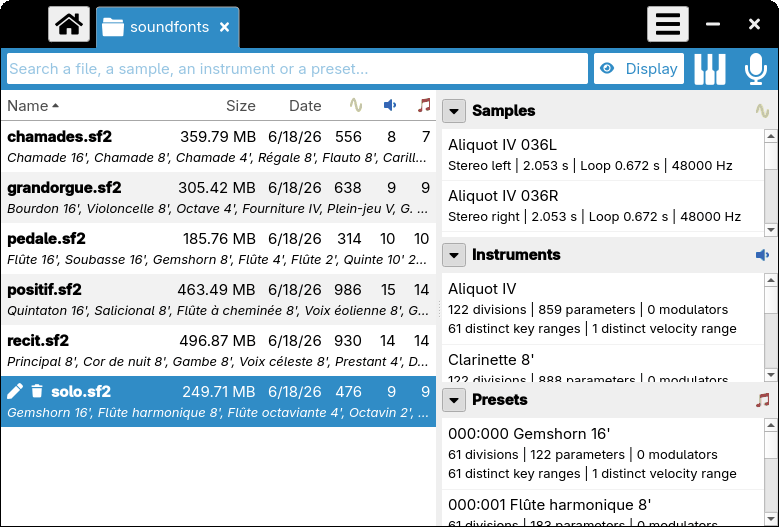
The sample, instrument or preset selected in the explorer can also be played with the virtual keyboard or a MIDI keyboard, without opening the soundfont in a tab: a quick way to audition a whole library. The recorder is available as well.
Online repository
The size of the soundfonts is displayed in the online repository and can be used as a filter (less than 1, 10 or 100 MB). Results can be sorted by trend (number of downloads over the last 90 days) or by size. The keyword search also looks in the tags and attributes, each word being searched separately.
Interface
Home screen and tabs
- an option reopens at startup the soundfonts and directories that were open when Polyphone was closed;
- soundfonts and directories can be opened by dragging them onto the tab bar;
- the mouse wheel over the tab bar, with Shift held down, goes to the previous or next tab;
- a history entry can be removed by clicking on its trash icon;
- the startup view can show the range or envelope editor of the first instrument, or the range editor of the first preset;
- messages published on polyphone.io (important information, new versions, announcements…) can be displayed in a banner of the home screen; this can be disabled in the settings.
Dialogs
- buttons are ordered according to the conventions of each operating system;
- Ctrl+Enter validates a dialog, even from a text field, and Esc cancels it;
- a double click on a row of a list with checkboxes ticks or unticks it.
Many other small details of the interface have been improved as well.
Fixes
- notes played with the computer keyboard could remain held when the virtual keyboard window lost the focus;
- the Esc key hid the progress window of a tool without stopping the tool;
- the calendar of the creation date could appear when a soundfont was opened in the background;
- a soundfont opened again while it was still loading was opened in a second tab;
- some sf2 files whose sample data have an odd size could not be read correctly;
- samples were saved in 16 bits even when the 24-bit resolution was chosen;
- the {wav} placeholder of the external command tool was empty;
- exporting several soundfonts could wrongly report more than 127 presets per soundfont.
Polyphone is free but there are costs associated with its website and development. A small donation will help a lot.
Donatetop