





General information
The page for editing the general information is displayed when the header General is selected in the tree. This page is made of three kinds of elements:
- editable fields,
- general information that is not editable,
- statistics about the soundfont.
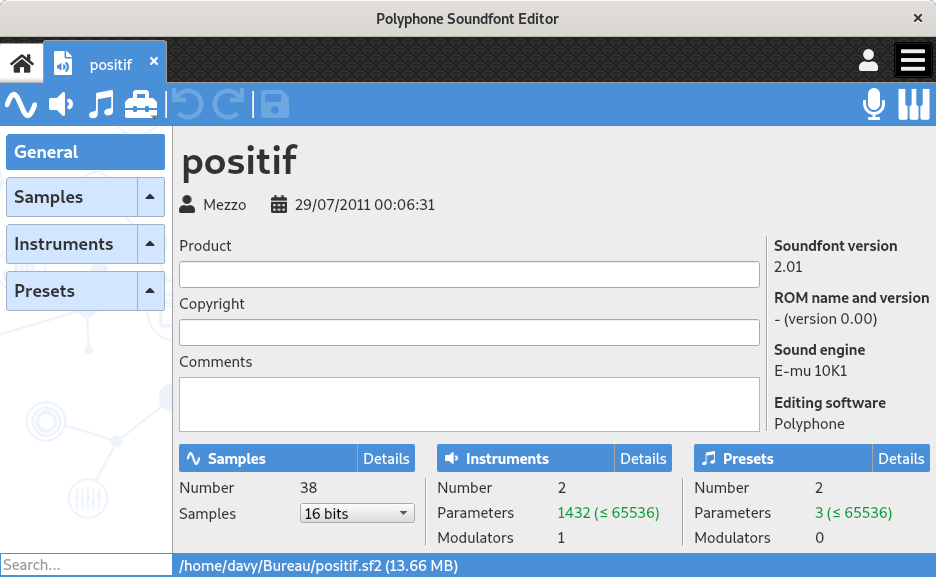
Editable fields
The editing page of the general information provides fields for changing the following attributes:
- Title
- This is the internal name of the soundfont, which does not necessarily have to do with the file name.
- Author
- Relates to the author name of the soundfont.
- Date
- Creation date of the file (a calendar helps to choose it).
- Product
- Product for which the soundfont is designed.
- Copyright
- Mention to fill in if the file is subject to copyright.
- Comments
- Information not included in any of the previous categories (the text can contain any UTF-8 character).
- Bit depth
- Indicates whether the samples are stored with a 16-bit or 24-bit resolution (in which case the compression is not allowed). Please note that 24-bit samples may not be supported in some synthesizers.
- Compression
- Enables the sample compression (in which case the bit depth is set to 16 bits). If this option is enabled, a compress button will be displayed in the sample editor. The compression is a feature provided by the sf3 format and might not be supported by all synthesizers. Enabling or disabling this option will determine the file format when saving, and Polyphone will change the file extension .sf2 / .sf3 if necessary.
General information
The editing page of the general information provides the following non-editable information:
- Soundfont format
- Version of the sf2 format used by the file.
- ROM name and version
- Name and version of a sample ROM if used.
- Sound engine
- Name of a sound engine.
- Editing software
- Editing software used for the soundfont creation.
These pieces of information are displayed in a tooltip when the mouse is over the information icon, at the end of the line showing the author and the date.
- File name and size
- Address and name of the file, and its size on the disk, displayed at the bottom of the window (the size is the one of the file as it was last saved).
Statistics
A count is made on:
- the number of samples, unused samples and duplicate samples,
- the number of instruments and unused instruments,
- the number of presets,
- the number of parameters and modulators edited for the instruments,
- the number of parameters and modulators edited for the presets.
The button Details next to the samples, the instruments and the presets displays the corresponding configuration summary.
Unused samples and instruments can be easily removed with the tool “Remove unused elements”. Duplicate samples can be removed with the tool “Clean duplicates”.
Note: The number of 65536 parameters in the instruments and the presets should not be exceeded. Some synthesizers may not be able to read them all.
Polyphone is free but there are costs associated with its website and development. A small donation will help a lot.
Donatetop