





Online repository
The online soundfont repository can be accessed directly in Polyphone, making it possible to download, test and possibly re-use soundfonts.
Access to the repository
To open the online repository, click on Online repository or write a keyword in the search field of the home screen and press Enter. Once the online repository is open in a new tab, the list of soundfonts available for download is displayed and it is possible to search, sort and filter the results. The results are displayed 25 per page, and buttons at the bottom allow going to the previous or to the next page.
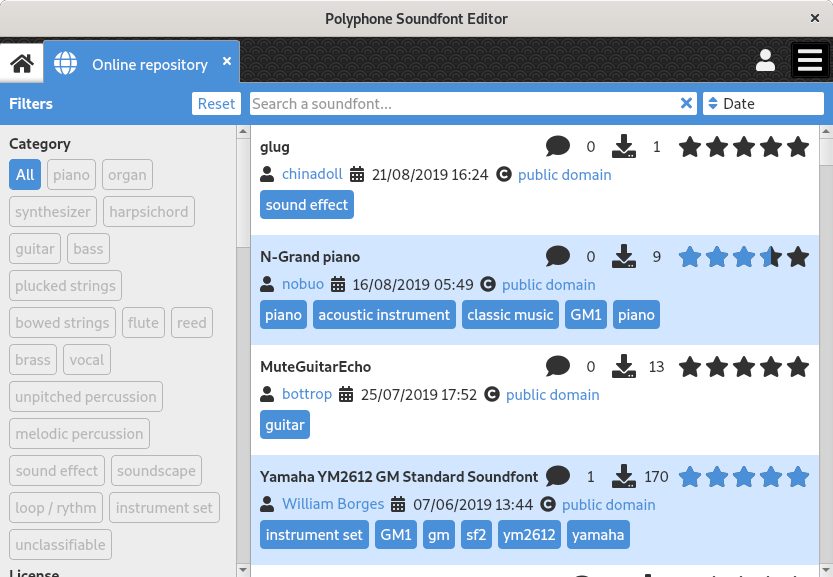
Searching a soundfont
For searching a soundfont, write a text in the top bar: the list is updated while typing and only displays the soundfonts in which each word of this text is found in the title, the tags or the attributes (category, sample source, genre, MIDI standard). It is possible to write Author:"someone" to search the soundfonts of a specific author (the exact name of the author must be written between the double quotes). This can be combined with a text to search, for instance piano Author:"someone".
Sorting the results
Next to the search bar, a drop-down menu provides 6 ways to sort soundfont results:
- Date
- Newest soundfonts are first (default choice).
- Trend
- Soundfonts most downloaded over the last 90 days are first. The number of downloads shown in each cell is then the number over the last 90 days.
- Downloads
- Most downloaded soundfonts are first.
- Rating score
- Highest rated soundfonts are first.
- Title (A→Z)
- Soundfont results are sorted in alphabetical order.
- Size
- Biggest soundfonts are first.
Filtering the results
Results can be filtered in different ways, several values being selectable for each filter. The button Reset cancels all filters.
- Category
- Kind of instrument.
- License
- It is possible to list soundfonts having a license that allows commercial use and / or sharing after the soundfont is edited.
- Sample source
- Origin of the samples.
- Genre
- Genre targeted by the soundfont.
- MIDI standard
- Only soundfonts compliant with a MIDI standard can be listed.
- Tags
- Show soundfonts having a specific tag.
- Size
- Only show soundfonts smaller than 1 MB, 10 MB or 100 MB. The size of each soundfont is displayed in the list after its date.
Soundfont description
A soundfont description can be opened with a double-click (or with Enter) on a cell in the Daily soundfonts of the home screen or in the soundfont list. A Premium account is required for soundfonts that are not in the Daily soundfonts. Polyphone can be connected to your account in the settings of the software.
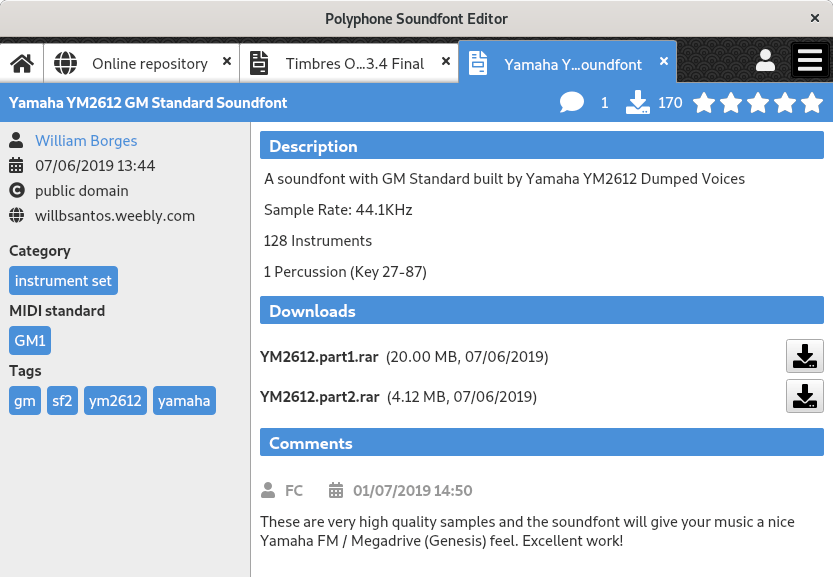
The description of a soundfont is made of:
- a header, in which you can find the title, the number of comments, the number of downloads and the rating,
- a left part, comprising the author name, a date, the license type (please pay attention to it), the category and other attributes that characterize the soundfont,
- a central part, displaying a textual description, the list of files to download and possible comments.
Download
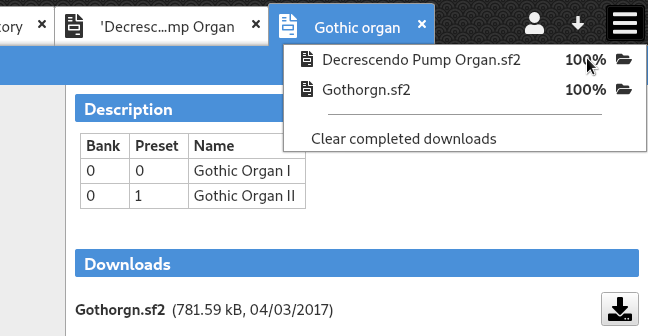
For downloading a file, click on the icon download next to its file name in the section Downloads. You will see the download progress in a menu next to the main menu, at the top right corner of the software. The files are saved in the download directory defined in the settings. Once a file is downloaded and if the file is a soundfont, it is possible to open it in a soundfont editor by clicking on the icon open.
It is possible from the menu to clear the completed downloads. If everything is cleared, the download menu disappears.
Polyphone is free but there are costs associated with its website and development. A small donation will help a lot.
Donatetop