





Polyphone plugin
The Polyphone plugin plays soundfonts in your digital audio workstation (DAW) and in the other hosts of audio plugins, with the synthesizer of Polyphone: a soundfont sounds the same in your projects and in the editor. It is free and open source.
The plugin plays the soundfonts but does not edit them: they are created and modified with the Polyphone editor, then opened in the plugin.
Download the plugin 2.7.1 (beta)
The list of changes is available here.
Each archive contains the plugin in the formats VST3, CLAP and LV2, and also AU (Audio Unit) for macOS: use the ones of your host.
Installation
Extract the archive of your system, then copy the formats used by your host in the folders where it looks for the plugins:
Windows
Polyphone.vst3→C:\Program Files\Common Files\VST3Polyphone.clap→C:\Program Files\Common Files\CLAPPolyphone.lv2→%APPDATA%\LV2
macOS
Polyphone.vst3→~/Library/Audio/Plug-Ins/VST3Polyphone.clap→~/Library/Audio/Plug-Ins/CLAPPolyphone.component→~/Library/Audio/Plug-Ins/ComponentsPolyphone.lv2→~/Library/Audio/Plug-Ins/LV2
Linux
Polyphone.vst3→~/.vst3Polyphone.clap→~/.clapPolyphone.lv2→~/.lv2
Then rescan the plugins in your host.
On macOS, the plugins are not notarized: if your host refuses to load them, remove the quarantine flag of the copied files, for instance with this command in the Terminal:
xattr -dr com.apple.quarantine ~/Library/Audio/Plug-Ins/VST3/Polyphone.vst3On Linux, the plugin uses the libraries libsndfile and libvorbisfile of the system, available in the packages of every distribution.
The installation and every setting of the plugin are described in the documentation.
Features
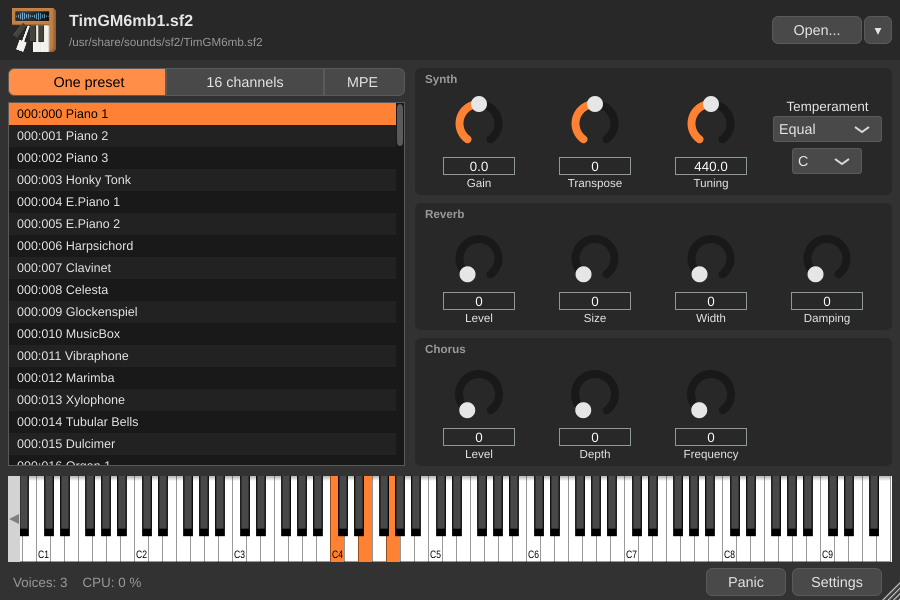
- sf2, sf3, sfz and dls soundfonts, opened with a button, from the recent files or by dropping them on the window.
- The synthesizer of Polyphone: a soundfont created or modified in the editor sounds the same in the plugin.
- Three playing modes: one preset on the 16 MIDI channels, one preset per channel or chosen by the program changes like a General MIDI synthesizer (convenient for a MIDI file), or one preset played by an MPE controller.
- Separate outputs for each MIDI channel and for the effects, to mix each instrument on its own track.
- Gain, reverb, chorus, transposition, tuning and temperament, all of them automatable by the host.
- The soundfont stored in the project if you wish: the project then opens on another computer without the file.
- One soundfont for several tracks: the file is loaded into memory only once, and nothing is read from the disk while playing.
- Precise timing: a note starts at the exact position of its MIDI message whatever the buffer size, and an offline export is never limited by the processor.
What to do next?
Find a soundfont
Browse the soundfonts shared by the community, download one and open it in the plugin.
Create your own instruments
Create or modify a soundfont with the Polyphone editor, then play it in your projects with the plugin.
Read the documentation
Each playing mode, setting and parameter of the plugin is described in the user manual.
Polyphone is free but there are costs associated with its website and development. A small donation will help a lot.
Donatetop