





Using Qt Creator to build Polyphone
Use these instructions to know how to build Polyphone with Qt Creator. It is assumed you already have on your computer Qt Creator installed with the Qt framework, a compiler and the necessary dependencies to build Polyphone (see related pages for this).
Prerequisite
The following elements are required:
- a C++ compiler (GCC, Clang, MinGW…),
- Qt Creator with its framework (Qt 6, or Qt 5),
- CMake (version 3.16 or more), which can be installed with Qt Creator,
- Polyphone dependencies.
The instructions for installing them are dependent on the OS you are using, see the related documentation pages for this.
Build Polyphone
Copy the sources
Get Polyphone sources from here or from GitHub .
Open and configure the project
Start Qt Creator and open the file CMakeLists.txt located in the directory sources.

Then configure the project by choosing a kit, that is to say a version of Qt and a compiler.
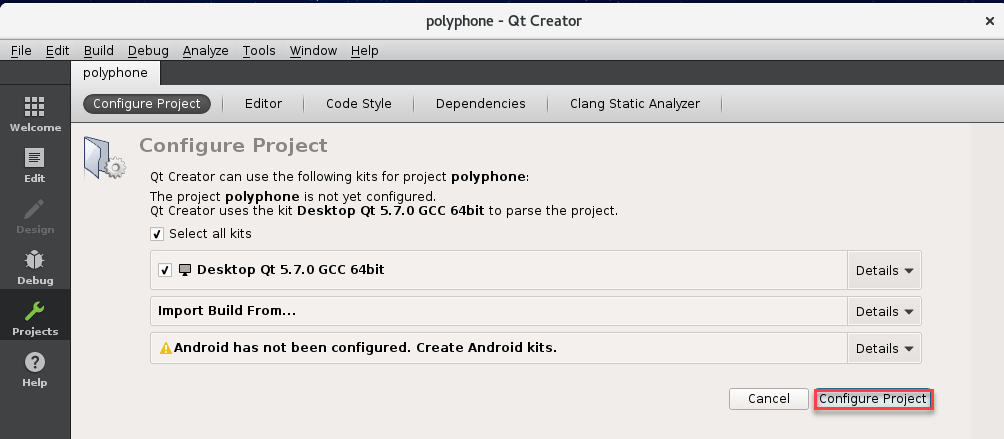
Qt Creator then runs CMake, which checks that the dependencies are found. The messages are displayed in the panel General Messages: if a library is missing, install it and run CMake again with the item Run CMake of the menu Build.
The options of the project are in the section Projects of the left column, under Build → CMake.
On Linux, the copies of RtAudio and RtMidi included in the sources can be used instead of the libraries of the system: enable the options POLYPHONE_LOCAL_RTAUDIO and POLYPHONE_LOCAL_RTMIDI, then click on Run CMake.
This is not necessary with Windows and macOS, the distributed versions being always used.
In the same section, select the build configuration (Release is preferred).
Build the project
Finally, click on the action Build Project "Polyphone" in the menu Build. During the project build you may see warnings but there should be no errors.
Now you should have the executable in the subdirectory bin of the build directory created by Qt Creator (build/Desktop_Qt6…-Release in the directory sources, for instance):
- with Linux, the file polyphone,
- with Windows, the file polyphone.exe,
- with macOS, the bundle Polyphone.app.
Troubleshooting
See this category if you need more information or for getting some help.
Special thanks to Tomotello for this article.
Polyphone is free but there are costs associated with its website and development. A small donation will help a lot.
Donatetop