





本论坛汇聚了来自世界各地的人们,因此大家使用英文交流。
-
When using "Replace by..." to replace a sample assignment, the list always opens with the first sample (alphabetically) selected. Instead, it would be far more helpful for the list to jump to the current sample instead, as most sample reassignments will be using a similarly-named sample (e.g., you will usually replace a violin sample with another violin sample, and not a bassoon). This would reduce the amount of scrolling needed to find the sample in the vast majority of cases. This is how Viena behaves, and I find it quite useful. This of course also applies to reassigning instruments within presets.
For example, here I have copied an instrument, and am reassigning all samples in the copy to use the second round robin sample instead of the first. When I go to reassign "VlnsAtk_B2_v1_r1L", Viena starts me off at that sample, and I can see the desired reassignment, ending in "r2L" two samples below the current selection:
-
Good suggestion, thank you.
I just fixed it and this will be included in the next version. -
Awesome! Thank you, Davy

-
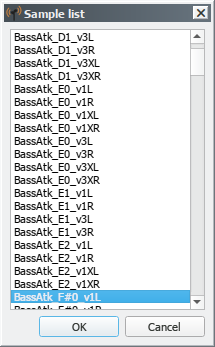
消息来自 S. Christian Collins,发表于The implementation of this feature is already making my workflow much faster. I do have one additional request: could the highlighted sample in the list be initially centered within the view? I've noticed that most often the highlighted sample is at the bottom of the selection window, and I have to scroll down a bit to pick my sample replacement:

I'm really loving the 2.0 beta so far! The additional functionality is great, and it also looks superb. Awesome work, Davy! -
Done
-
I discovered a bug with the sample centering. Open a SoundFont, then expand an instrument and right-click on a sample -> "Replace by...". The selected sample will be at the top of the view instead of centered. Click "cancel" and do "Replace by..." again, and now it's centered. Any further sample replacements within the SoundFont will now be centered. The same thing happens when replacing instruments within a preset.
So it looks like the code for centering the highlighted division doesn't work the first time in a newly-opened SoundFont.
I am running Polyphone 2.0 compiled in KDE neon 5.14 (based on Ubuntu 18.04). -
You are right. This is fixed
Changes will be included in version 2.0.1


返回
顶部